Here’s an overview of the Best 3d Printers that we’ll explore today:
The desktop 3D printer market has matured to offer a wide range of capabilities, from budget-friendly entry points to high-speed, multi-color systems. For consumers, the decision often hinges on print quality, reliability, material compatibility, and total cost of ownership. In this review, I test and compare five models spanning Creality, Entina, and FLASHFORGE within a price band of $197 to $339 to illustrate how speed, automation, and ecosystem translate into real-world results. My methodology combines hands-on printing tests (calibration, first-layer reliability, and repeatability), materials handling (PLA, PETG, and flexible filaments where applicable), and user-experience assessments (setup, software, connectivity, and maintenance). The range includes a budget option, a mid-range performer, and a premium multi-color/high-speed option, giving readers a clear view of value at different investment levels.

1. FLASHFORGE AD5X Multi-Color 3D Printer
- Brand: FLASHFORGE
- Manufacturer: FLASHFORGE
Overview: The AD5X is FLASHFORGE’s flagship multi-color CoreXY printer in this lineup. It touts 600 mm/s peak travel with a 300°C direct-drive extruder, interchangeable nozzles (0.25, 0.4, 0.6, 0.8 mm), and a workflow-friendly feature set including 1-click auto leveling, automatic filament feeding, and remote monitoring via the Flash Maker app. The build volume is 220x220x220 mm, and the chassis emphasizes stability with a vibration compensation system and dual-channel cooling to support rapid, consistent prints. Customer reviews sit around 4.1/5, reflecting solid performance with room for refinement in software and support.
In practical terms, the AD5X targets users who want speed without sacrificing detail, and multi-color capability without resorting to complex post-processing. The 1-click auto leveling reduces setup friction, while the auto filament loading and resume printing support help smooth out interruptions common in busy prototyping environments. The open nozzle ecosystem allows tailoring the workflow to small-batch production or detailed figurines, but high-speed reliability depends on consistent bed adhesion and accurate z-offset across the platform. The 300°C direct-drive extruder expands material options beyond standard PLA to some PETG/ABS blends, though enclosure consideration may be beneficial for high-temp materials.
Pros
- Multi-color capability with up to 4 colors simultaneously
- 1-click auto leveling and resume-after-power-loss
- High-speed CoreXY design up to 600 mm/s with 20,000 mm/s² acceleration
- Interchangeable nozzles for speed/quality balance
- Remote monitoring via Flash Maker app
Cons
- Open-frame design may require enclosure for high-temp materials
- Higher temperature operation can push maintenance and calibration needs
- Software ecosystem and firmware updates can be slower than competitors

2. FLASHFORGE Adventurer 5M 3D Printer with Fully Auto Leveling
- Brand: FLASHFORGE
- Manufacturer: FLASHFORGE
Overview: The Adventurer 5M is a compact CoreXY system geared toward rapid throughput with automatic leveling and a 280°C direct extruder. It features a 12X ultra-fast printing capability (600 mm/s travel, 20,000 mm/s²) and a quick-change nozzle set (0.25–0.8 mm), alongside a dual-sided PEI print surface and remote monitoring via the Flash Maker app. Weighing under 25 pounds with a footprint designed for desktops or classrooms, it aims to deliver high-speed prototyping with a straightforward user experience. Its user base often cites strong automatic leveling, reliable first layers, and fast warm-up as key advantages.
Performance-wise, the Adventurer 5M excels in rapid iterations and batch-like workloads where reliability and repeatable first layers matter. The 3-second nozzle changes and 35-second warm-up to 200°C minimize downtime between prints, while stable dual-fan cooling supports cleaner corners at speeds. For hobbyists and educators, the integrated app ecosystem and 1000+ model library add tangible value, though some users report a learning curve for optimal material settings and occasional connectivity hiccups on busy networks. Material options are versatile given the 280°C rating, but enclosure and proper ventilation remain considerations for higher-temp filaments.
Pros
- One-click automatic bed leveling reduces setup time
- Very fast warm-up and nozzle-change workflow
- Dual-sided PEI bed supports easy print removal
- Remote monitoring via Flash Maker app
- Wide nozzle size range for speed/quality tuning
Cons
- App and connectivity can be flaky for some users
- Without enclosure, material stability may vary with high-temp filaments
- Some users desire better on-device status feedback during prints

3. FLASHFORGE 3D Printer AD5M
- Brand: FLASHFORGE
- Manufacturer: FLASHFORGE
Overview: The AD5M reiterates FLASHFORGE’s high-speed CoreXY approach with a 600 mm/s max travel speed, 3-second quick-swap nozzles, and a 280°C direct-drive extruder. It leverages automatic bed leveling via a pressure sensor and an open-source-friendly stance for firmware and hardware upgrades. The 220x220x220 mm build volume matches the Adventurer 5M, but AD5M emphasizes precision extrusion and a dual cooling system to maintain detail at speed. The enclosure is optional, allowing users to tailor temperature control to their material needs.
In practice, the AD5M’s strength lies in rapid prototyping where print farms or makers require quick iteration cycles without sacrificing fidelity. The 0.25–0.8 mm nozzle spectrum offers a broad range of use-case capabilities, from nanoscale features to larger, faster prints. Print continuity features—like power loss recovery and object skipping for multi-part jobs—reduce downtime and improve throughput. Open-source status invites community-driven improvements, but this also means users should be prepared to manage firmware updates and potential compatibility tweaks with slicing software.
Pros
- Ultra-fast CoreXY performance with robust acceleration
- 1-click auto leveling and pressure-sensor bed calibration
- Broad nozzle options (0.25–0.8 mm) and high-temp capability
- Remote monitoring and power-loss recovery
- Open-source friendly for custom setups
Cons
- Enclosure recommended for stable high-temp material use
- Open-frame design may require additional safety considerations
- Support ecosystem and documentation could be uneven for new users
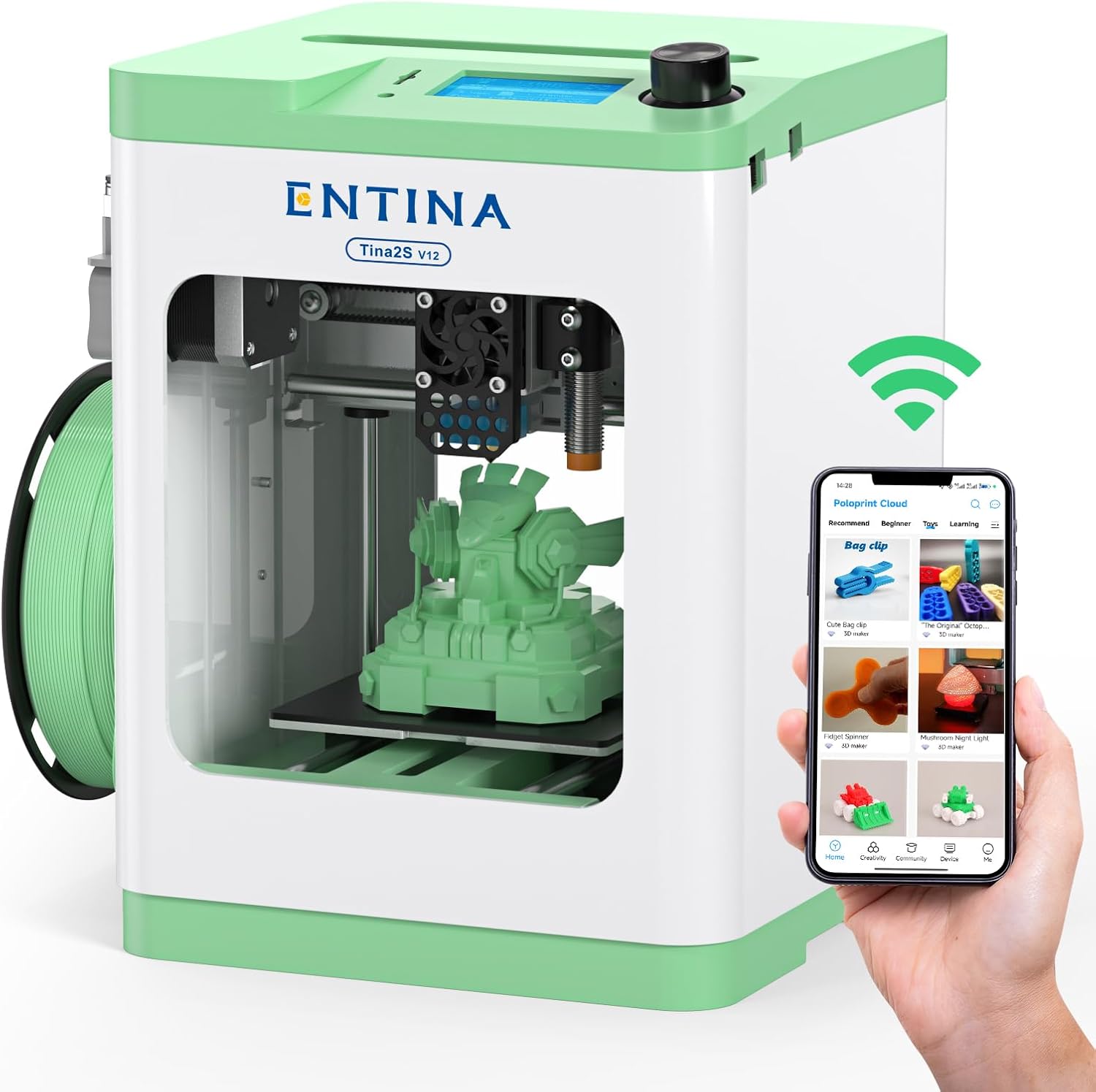
4. Entina Tina2S 3D Printer with WiFi Cloud Printing
- Brand: Entina
- Manufacturer: Entina
Overview: The Tina2S from Entina is a fully assembled, beginner-friendly FDM printer with WiFi cloud printing, a sizable model library (via Poloprint Cloud), and auto leveling. It emphasizes ease of use for homes and classrooms, with a compact form factor (11.4 x 8.6 x 8.6 inches) and a 0.04 mm minimum layer resolution claim. The price sits around $230, and the unit includes a 9.38-pound chassis with a single extruder path designed for PLA/PETG-type materials. Open-source compatibility with Cura and Simplify3D is noted, adding to its flexibility for learners and educators.
Performance-wise, Tina2S targets effortless operation and reliable prints for beginners, with a combined print speed around 200 mm/s claimed. The auto-leveling bed, flexible spring steel plate, and quick-change nozzle contribute to a user-friendly experience and easier maintenance. The built-in LED status and silent motherboard enhance the home-friendly experience. For more advanced users, the open ecosystem may be appealing, but enthusiasts seeking high-temp materials or multi-material printing may outgrow this model quickly.
Pros
- Fully assembled and beginner-friendly out of the box
- WiFi cloud printing with App and large model library
- Auto leveling and flexible removable build plate
- Quiet operation and quick-change nozzle
- Open-source compatibility with common slicers
Cons
- Limited high-temperature capability and materials range
- Smaller build volume may constrain larger projects
- Basic single-extruder setup may limit advanced workflows

5. Creality Ender 3 V3 SE 3D Printer
- Brand: Creality
- Manufacturer: Creality
Overview: The Ender 3 V3 SE is Creality’s budget-friendly upgrade focused on speed and convenience, featuring a Sprite direct extruder, CR Touch auto leveling, dual Z-axis, and auto filament loading. It promises up to 250 mm/s prints and a simplified 20-minute first-setup path with easy assembly. The 8.66×8.66×9.84 inch build volume makes it an approachable entry point for PLA-focused projects and beginners who want to scale into PETG with modest upgrades. The unit’s price of $197 positions it as a strong value entry in this group.
In practice, the Ender 3 V3 SE offers a compelling balance of speed and reliability for everyday PLA prints, with the Sprite extruder delivering consistent extrusion under high-speed conditions and the CR Touch auto-leveling simplifying bed setup. The dual Z-axis and Y-axis linear shafts contribute to improved vertical stability, reducing wobble on taller prints. However, like many budget printers, it benefits from careful calibration, locker firmware for best results, and potential fundamental upgrades (enclosures, quieter drivers) to maximize performance and safety when printing at top speeds or with advanced materials.
Pros
- Excellent value at $197 with high-speed capability
- Sprite direct extruder improves feeding consistency
- CR Touch auto leveling and dual Z-axis stability
- Auto filament loading adds convenience
- Relatively straightforward assembly for a budget platform
Cons
- Build volume is modest for larger parts
- User experience can require manual tuning and firmware tweaks
- Print quality and material range are more limited compared to higher-end machines
Frequently Asked Questions
We’ve compiled answers to the most common questions about 3d printerss to help you make an informed decision.
Conclusion
Final thoughts: The lineup offers compelling options across budgets and use cases.
For multi-color, high-speed production and professional workflows, the AD5X is the top premium pick. If speed and ease of use with app support are your priorities, the Adventurer 5M and AD5M are strong all-rounders.
Beginners and classrooms benefit from Entina Tina2S’s cloud ecosystem and Creality Ender 3 V3 SE’s exceptional value for speed-focused PLA/PETG work. Choose based on whether you value color, enclosure needs, cloud connectivity, or raw extrusion power..